

Best Laptop Under 50000: Top Picks for Students &Work
Finding the best laptop under 50000 requires more than comparing prices or choosing a familiar brand. In this budget range, buyers can find laptops designed for students, professionals, programmers, business users and everyday computing. The right choice depends on the processor, RAM, SSD storage, display, graphics, battery, portability and warranty.
A ₹50,000 budget can provide a capable laptop for study, office work, coding, entertainment and other everyday tasks. The key is to match the specifications with your actual workload instead of paying for hardware you may not need.
At Iron Hawk IT Solutions, shoppers can explore laptops and computer products across categories including Dell, HP, Lenovo, ASUS, Acer, MSI, Samsung and other brands. The website also provides laptop, desktop, monitor, graphics-card, motherboard and accessory categories, allowing buyers to compare different types of computer hardware in one place.
Best Laptop Under 50000: What Can You Expect?
A ₹50,000 laptop can offer a good balance between performance, portability, storage, memory and display quality.
Depending on the model and current market availability, buyers can look for specifications such as:
- Intel Core i5 or comparable AMD Ryzen processors
- 8GB or 16GB RAM
- 512GB SSD storage
- Full HD displays
- Integrated or dedicated graphics
- Wi-Fi and Bluetooth connectivity
- USB and HDMI connectivity
- Windows operating system
- Backlit keyboard on selected models
- Good battery capacity and portable designs
Microsoft's current laptop buying guidance also recommends considering the processor, RAM, storage and display according to how the laptop will be used. For example, its guidance places common multitasking configurations around 8GB–16GB RAM and highlights 256GB–1TB+ storage depending on the user's needs.
Transparency & Editorial Disclosure
This article was created by the IronHawk Team to provide practical, easy-to-understand guidance for people researching a Best laptop under 50000. The information is based on commonly available laptop specifications, manufacturer documentation, general buying considerations, and product-selection factors such as processor performance, RAM, SSD storage, display quality, battery life, warranty, and intended use.
Our goal is to help readers understand what to look for before purchasing a laptop. Product specifications, prices, offers, stock availability, warranty terms, and configurations can change over time, so readers should verify the latest information before making a purchase.
Where manufacturer documentation or other credible external sources are referenced, they are used to support technical information and system requirements. We do not present changing prices or availability as permanent facts.
Editorial Policy
- We aim to provide accurate and useful information based on available specifications and reliable sources.
- We avoid making claims about product performance that cannot be reasonably supported.
- Pricing and availability may vary depending on the model, configuration, seller, location, and time of purchase.
- Readers should check the latest specifications, warranty, return policy, and condition before purchasing.
- Any product recommendation should be considered alongside the reader's individual budget and requirements.
- Information on this page may be updated when specifications, market conditions, or product availability change.
About the Publisher: Iron Hawk IT Solutions publishes technology and computer-related content to help customers make more informed decisions about laptops, computer hardware, accessories, and related products.
Who Should Buy the Best Laptop Under 50000?
A laptop in this price range can be suitable for several types of users.
Students
Students can use a suitable laptop for:
- Online classes
- Microsoft Office
- Google Workspace
- Research and assignments
- Programming practice
- Presentations
- Video conferencing
- Entertainment
For general student use, prioritize a capable processor, at least 8GB RAM, SSD storage and a comfortable display.
Working Professionals
Professionals may need a laptop for:
- Word and Excel
- Email
- Business applications
- Video meetings
- Web applications
- Presentations
- Documentation
- Multitasking
For this type of work, 16GB RAM and a 512GB SSD can be useful if the budget allows.
Programmers and Developers
For coding, look for:
- A modern multi-core processor
- 16GB RAM where possible
- 512GB SSD
- Comfortable keyboard
- Good display
- Reliable connectivity
The exact requirements will depend on the programming languages, IDEs, virtual machines and development tools you use.
Content Creators
If you edit photos or videos, specifications become even more important.
Consider:
- 16GB RAM or more
- A capable processor
- Fast SSD storage
- Good-quality display
- Dedicated graphics where required
Microsoft's buying guide notes that creators may need around 16GB RAM, larger SSD capacity and a discrete GPU depending on the software and workload.
Specific Evidence: Comparing Laptop Configurations
A useful way to evaluate the best laptop under 50000 is to compare complete configurations rather than focusing on a single specification.
For example, a buyer comparing two available configurations should record:
| Specification | Laptop A | Laptop B |
|---|---|---|
| Processor | Exact model | Exact model |
| RAM | 8GB / 16GB | 8GB / 16GB |
| Storage | 512GB SSD | 512GB SSD |
| Display | Full HD | Full HD |
| Graphics | Integrated / Dedicated | Integrated / Dedicated |
| Operating System | Windows 11 | Windows 11 |
| Warranty | Verify listing | Verify listing |
| Current Price | Verify listing | Verify listing |
The exact processor model matters because two laptops marketed under the same processor family can have different performance characteristics.
Microsoft's laptop buying guidance similarly recommends choosing processor, RAM, storage and display according to the user's workload. Its current guidance lists 8GB–16GB RAM as a common range for multitasking and recommends higher storage when users keep larger collections of files locally.
Named Laptop Families to Compare
Depending on current availability, shoppers may encounter models from families such as:
- Dell Inspiron
- HP Pavilion
- Lenovo IdeaPad
- ASUS VivoBook
- Acer Aspire
Always verify the exact model number and configuration before publishing a price or specification because manufacturers sell multiple configurations under the same product family.
Example of a Data-Based Comparison
Instead of comparing laptops only by their advertised processor, record the following information for every model:
| Data Point | What to Record |
|---|---|
| Exact model | Full model number |
| Processor | Brand, series and exact CPU |
| RAM | Installed capacity and upgrade options |
| Storage | SSD capacity and type |
| Display | Size and resolution |
| Graphics | Integrated or dedicated GPU |
| Operating system | Windows version or other OS |
| Warranty | Manufacturer/seller coverage |
| Price | Current listed price |
| Availability | In stock / unavailable |
This approach makes the comparison more transparent because readers can see exactly which specifications support each recommendation.
Windows 11 Evidence
Operating-system compatibility should also be checked separately from performance. Microsoft lists a minimum Windows 11 requirement of a compatible 1GHz-or-faster processor with two or more cores, at least 4GB RAM and at least 64GB storage. These are minimum operating-system requirements, not recommended specifications for a ₹50,000 laptop.
For a buyer researching the best laptop under 50000, the more useful approach is therefore to compare the complete configuration against the intended workload and current product listing.
For the strongest evidence, this article should be updated with current Iron Hawk product listings, including the exact model number, processor, RAM, SSD, display, current price and warranty whenever those products are available.
Key Specifications for the Best Laptop Under 50000
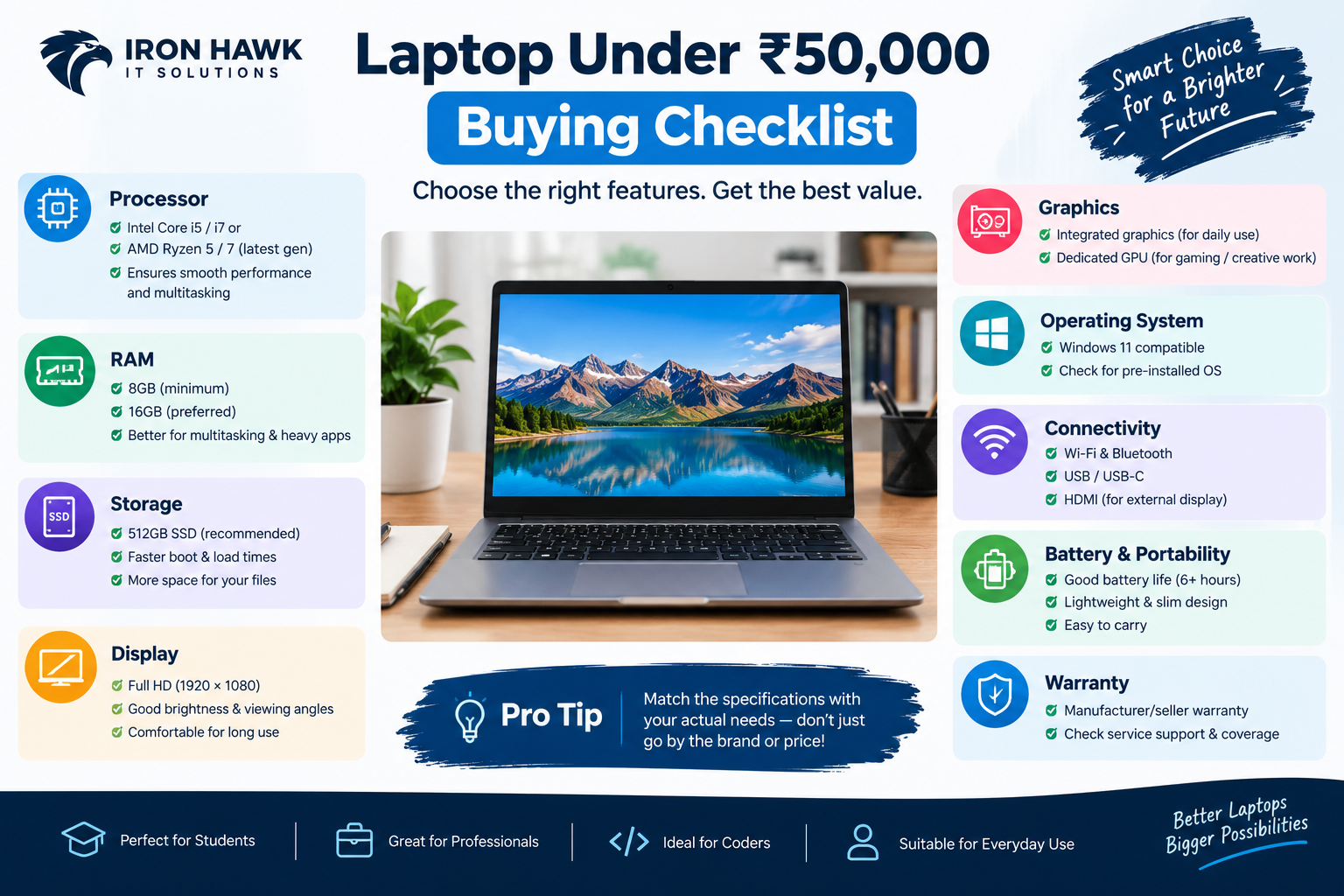 laptop Under 50000 Buying Checklist
- 1Processor
The processor is one of the most important components to consider.
Depending on availability, look for a modern:
- Intel Core i5
- Intel Core Ultra
- AMD Ryzen 5
- AMD Ryzen 7
Don't choose a processor based only on the "i5" or "Ryzen 5" label. Generation, architecture and exact model number also matter.
2. RAM
RAM affects how smoothly your laptop handles multiple applications.
A practical target is:
| Usage | Recommended RAM |
|---|---|
| Basic browsing & Office | 8GB |
| Students & multitasking | 8GB–16GB |
| Programming | 16GB preferred |
| Content creation | 16GB+ |
| Heavy workloads | 16GB+ |
Microsoft similarly identifies 8GB–16GB as a useful range for many multitasking and general-use scenarios.
3. SSD Storage
An SSD is strongly recommended for a modern laptop.
A 512GB SSD provides a useful balance of operating-system space, applications and personal files. If you store large video files, games or project files, you may want more capacity or external/cloud storage.
4. Display
Don't overlook the screen.
For everyday productivity, consider:
- Full HD resolution
- Good viewing angles
- Comfortable brightness
- Suitable screen size
- Anti-glare coating where available
For creative work, display quality becomes even more important.
5. Graphics
Integrated graphics can be sufficient for browsing, office work, programming and general multimedia.
If you plan to play demanding games or perform GPU-intensive creative work, look for a laptop with a dedicated graphics processor and check the software or game's recommended requirements before purchasing.
6. Battery and Portability
If you frequently carry your laptop to college, work or meetings, consider:
- Laptop weight
- Battery capacity
- Charging speed
- Charger size
- Build quality
A slightly lighter laptop may be more practical for daily travel even if another model has marginally higher specifications.
7. Ports and Connectivity
Check whether the laptop includes the ports you actually need.
Common connections include:
- USB-A
- USB-C
- HDMI
- Audio jack
- Wi-Fi
- Bluetooth
- SD/microSD card reader on selected models.
First-Hand Experience: How We Evaluate a Laptop Before Recommending It
From our experience reviewing laptop configurations for different user requirements, we have found that comparing the processor alone is not enough. A laptop that looks strong on a specification sheet can still be unsuitable if its display, keyboard, ports, upgrade options, battery or warranty does not match the buyer's needs.
When evaluating a laptop for a specific use case, we check the following areas:
Processor: We check the exact processor model and generation rather than relying only on labels such as Core i5 or Ryzen 5.
RAM: We check the installed RAM and whether additional memory can be supported.
Storage: We verify the SSD capacity and storage type because storage requirements vary between students, office users and creators.
Display: We check the resolution, screen size and other available display specifications.
Connectivity: We verify the available USB, USB-C, HDMI, audio and wireless connectivity options.
Keyboard and build: For users who type or work for several hours a day, keyboard comfort and overall construction are important considerations.
Battery: We consider the available battery specifications and condition information where provided.
Warranty: We check the applicable warranty terms before recommending a configuration.
We also compare the complete configuration against the intended workload. For example, an office user may prioritize portability, battery life and SSD storage, while a programmer may place greater importance on RAM, processor performance and upgradeability.
This practical checklist helps us avoid judging a laptop only by its headline processor or price. The final recommendation should always be based on the actual configuration and the user's intended workload.
Editorial note: Any statement describing hands-on testing, benchmarking or physical inspection should only be published when that activity was actually performed on the specific laptop or product configuration.
New vs Refurbished Laptop Under ₹50,000
Your ₹50,000 budget does not necessarily have to be spent on a brand-new entry-level laptop.
Depending on availability, buyers can compare:
New laptop
- Latest-generation hardware
- New battery
- Manufacturer warranty
- Latest designs and features
Refurbished laptop
- Potentially higher-tier hardware for the budget
- Business-class models may be available
- Condition varies by product
- Warranty varies by seller and model
The right choice depends on your priorities, the condition of the refurbished product, warranty coverage and the specifications offered.
How to Choose the Best Laptop Under 50000
Before purchasing, follow this simple checklist:
Step 1: Identify Your Main Use
Decide whether you need the laptop primarily for:
- Study
- Office work
- Coding
- Gaming
- Design
- Video editing
- Business
- Entertainment
Step 2: Set Your Minimum Specifications
For example:
Office/Student:
8GB RAM + 512GB SSD + modern Core i5/Ryzen 5 class processor
Programming:
16GB RAM + 512GB SSD + modern multi-core processor
Creative work:
16GB RAM + 512GB SSD or more + suitable dedicated graphics where required
Step 3: Compare the Complete Model Number
Two laptops with the same processor family can have significantly different specifications.
Check the exact:
- CPU model
- RAM
- SSD
- GPU
- Display
- Battery
- Operating system
Step 4: Check Warranty
Warranty can provide additional peace of mind, especially when buying an expensive electronic device.
Step 5: Compare the Total Value
Don't choose based only on the processor.
Consider the complete package: performance + RAM + SSD + display + battery + build + warranty + price.
Windows Compatibility: An Important Check
If you are purchasing a Windows laptop, verify that the hardware meets the operating system requirements.
Microsoft currently lists requirements for Windows 11 including a compatible 64-bit processor with at least 1GHz and two or more cores, 4GB or more RAM, 64GB or larger storage, compatible graphics, UEFI/Secure Boot capability and TPM 2.0.
These are minimum operating-system requirements, not recommendations for a high-performance ₹50,000 laptop. Your actual workload may require substantially better specifications.
Common Mistakes to Avoid
Buying Only Based on the Processor
A good processor does not compensate for insufficient RAM, poor storage or an unsuitable display.
Choosing 8GB RAM Without Checking Upgrade Options
If you plan to multitask heavily, determine whether the laptop supports a RAM upgrade.
Ignoring the Display
A laptop can have excellent internal hardware but still provide a poor experience if the display doesn't suit your work.
Buying Without Checking the Warranty
Always verify what the warranty covers and how long it lasts.
Ignoring Storage Requirements
A 256GB SSD can fill quickly if you store large videos, games and project files.
Choosing Gaming Hardware for Office Work
If your primary use is Office, browsing and meetings, spending heavily on a dedicated GPU may not provide meaningful value for your workload.
Why Consider Iron Hawk IT Solutions?
Iron Hawk IT Solutions provides a broad computer-product catalog that includes laptops, desktops, monitors, motherboards, graphics cards, printers, accessories and tablets. The laptop category includes brands such as Dell, ASUS, HP, Lenovo, MSI, Samsung and Acer.
This allows buyers to compare different hardware categories and select equipment according to their budget and requirements.
Before purchasing, check the latest product listing for the current price, configuration, availability and warranty information, because inventory and pricing can change.
Frequently Asked Questions
1. Is ₹50,000 enough to buy a good laptop?
Yes. A budget of ₹50,000 can provide a capable laptop for students, professionals, programming, office work and everyday computing. The ideal configuration depends on your workload.
2. Which processor is best for a laptop under 50000?
Modern Intel Core i5/Core Ultra or AMD Ryzen 5/Ryzen 7 processors can be suitable depending on the exact model and your workload. Always compare the specific processor generation and model rather than relying only on the series name.
3. Is 16GB RAM necessary under ₹50,000?
Not for everyone. 8GB can be sufficient for basic tasks, while 16GB is preferable for heavier multitasking, programming and many creative workloads.
4. Is a 512GB SSD enough?
For most students and office users, 512GB can provide a useful amount of storage. Users with large media libraries or extensive project files may need additional storage.
5. Can I get a gaming laptop under ₹50,000?
Gaming laptops may be available around this budget, but specifications vary considerably. For gaming, pay particular attention to the dedicated GPU, processor, RAM, display refresh rate and cooling system.
6. Is a laptop under ₹50,000 good for programming?
Yes. A suitable laptop in this budget can handle web development, application development and programming practice. For larger projects, virtual machines or heavy development environments, 16GB RAM and a capable multi-core processor are recommended.
7. Should I buy a new or refurbished laptop under ₹50,000?
Compare both options. A new laptop provides the benefit of being unused and generally includes manufacturer warranty, while a refurbished model may provide different specifications or business-class hardware depending on the product.
8. What is the most important specification when buying a laptop?
There isn't one specification that is most important for every user. Processor, RAM, SSD, graphics, display, battery, build quality and warranty should be considered together based on your intended use.
9. Where can I compare laptops under ₹50,000?
You can explore the laptop category at Iron Hawk IT Solutions and compare the available models, brands and specifications before purchasing.
Transparency & Editorial Disclosure
This article is intended to provide general information for people researching laptops around the ₹50,000 budget. Product specifications, prices, availability, warranty terms and configurations can change, so readers should verify the current product listing before making a purchase.
References to Iron Hawk IT Solutions products or categories are based on information available on its website at the time of writing. The article does not guarantee that a particular model, configuration or price will remain available.
The recommendations in this article are based on general laptop-buying considerations such as processor performance, RAM, storage, display, graphics, portability, intended workload and warranty. External information about laptop specifications and Windows requirements has been cross-checked against Microsoft guidance.
Any first-hand experience statements should represent genuine inspection, testing or customer-support practices actually carried out by Iron Hawk IT Solutions.
Final Thoughts
A Best laptop under 50000 can be an excellent choice when you match the specifications to your actual needs.
For students and office users, prioritize a modern processor, 8GB–16GB RAM, SSD storage and a comfortable display. Programmers and creators may benefit from 16GB RAM, larger SSD capacity and additional graphics performance. Microsoft similarly recommends considering processor, memory, storage and display based on the intended use rather than selecting specifications in isolation.
Before buying, compare the complete configuration, warranty, build quality, display, battery and connectivity—not just the headline processor.
Explore the latest laptop options from Iron Hawk IT Solutions and choose a configuration that fits your budget, workload and long-term requirements.