
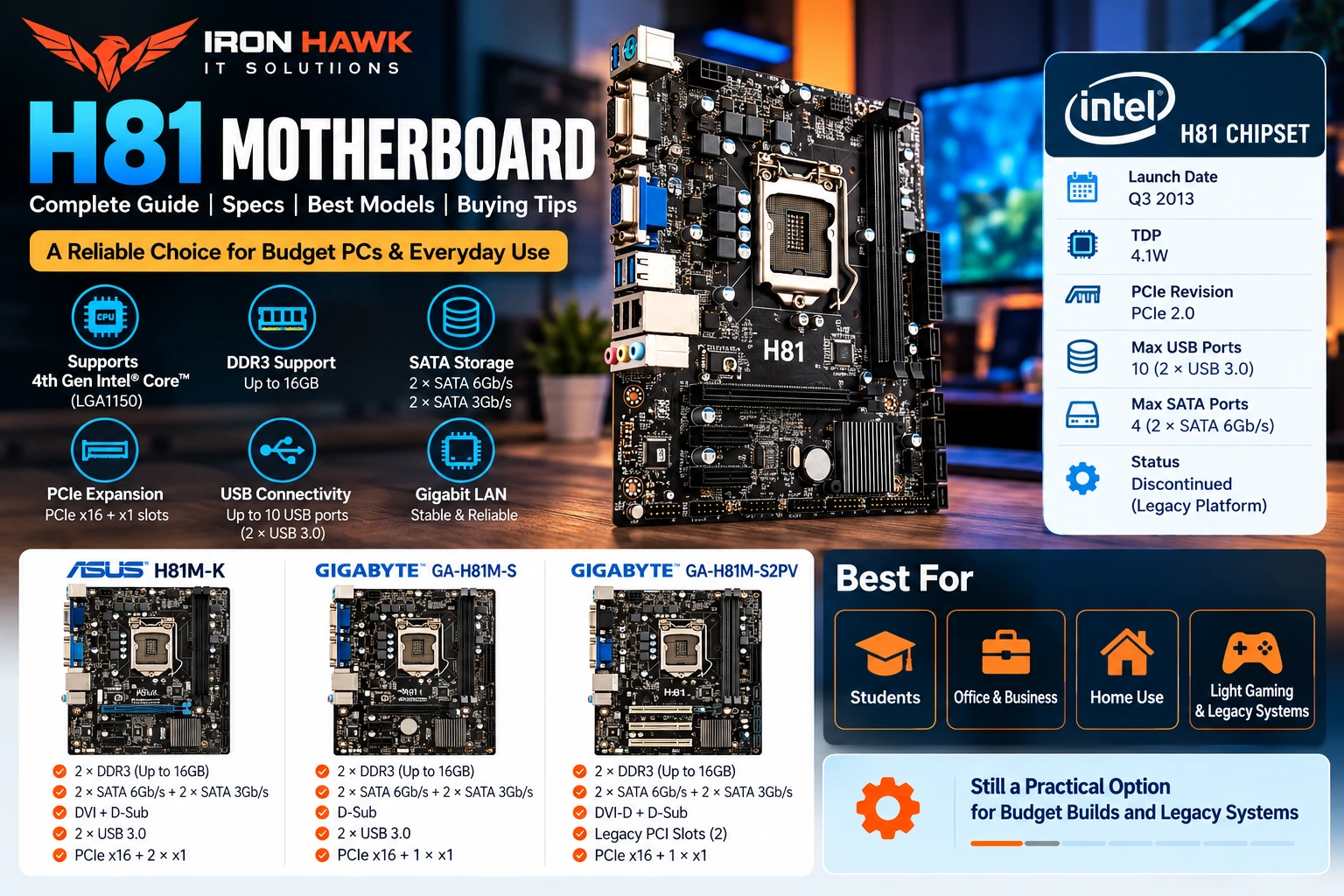
H81 Motherboard: Complete Guide, Specs, Compatibility & Uses
Introduction
The H81 motherboard remains a recognizable option in older desktop computers, refurbished systems, repair projects, and budget PC configurations built around Intel's LGA1150 platform.
Intel introduced the H81 chipset as part of its 8 Series desktop chipset family. It was designed for systems using compatible processors from the LGA1150 era and provides fundamental desktop connectivity such as SATA, USB, and PCI Express.
Today, however, the platform is significantly older than current-generation motherboard platforms. Intel lists the H81 chipset as discontinued, which makes compatibility, component condition, operating-system requirements, and upgrade limitations particularly important when considering an H81-based PC.
For users who already own a compatible processor and DDR3 memory, an H81 board can still have practical value for repairing or maintaining an older computer. For a completely new PC build, buyers should compare the total cost and limitations of the older platform against newer hardware before purchasing.
This guide covers H81 specifications, processor compatibility, RAM, storage, PCIe, real motherboard examples, practical use cases, limitations, and the checks we recommend making before buying.
H81 Motherboard: What Is It?
An H81 motherboard is a motherboard built around Intel's H81 chipset.
Intel identifies H81 as part of its Intel 8 Series Chipsets, with the platform originally launched in Q3 2013.
The chipset was designed for desktop systems and is commonly found in motherboards using the LGA1150 socket.
Typical H81 motherboard configurations can include:
- Intel H81 chipset
- LGA1150 CPU socket
- DDR3 memory
- PCI Express expansion
- SATA storage connectivity
- USB 3.0 and USB 2.0
- Ethernet
- Integrated audio
- Display outputs depending on motherboard model
- Micro-ATX form factor on many models
Exact features depend on the motherboard manufacturer and model.
This distinction is important:
H81 describes the chipset, not one specific motherboard.
ASUS, GIGABYTE and other manufacturers produced boards using the H81 chipset, and individual models can have different ports, layouts, display outputs and expansion options.
H81 Motherboard Key Specifications
Intel's chipset documentation provides a useful baseline for understanding H81.
| Feature | Intel H81 Platform Information |
|---|---|
| Product Family | Intel 8 Series Chipsets |
| Platform | Desktop |
| Launch | Q3 2013 |
| Status | Discontinued |
| PCI Express Revision | PCIe 2.0 |
| Maximum Chipset PCIe Lanes | 6 |
| Processor PCIe Configuration | 1 × 16 supported |
| Total USB Ports | Up to 10 |
| USB 3.0 | Up to 2 |
| USB 2.0 | Up to 8 |
| Total SATA Ports | Up to 4 |
| SATA 6 Gb/s | Up to 2 |
| Memory Overclocking | Not supported by chipset |
These are chipset-level capabilities. The ports physically exposed on a particular motherboard can vary according to the board manufacturer's design.
First-Hand Experience: How We Evaluate an H81 Motherboard
From our experience evaluating older and budget PC configurations, the most important question with an H81 system is not simply:
“Does the motherboard turn on?”
Instead, we evaluate whether the complete platform is appropriate for the intended workload and whether all of the components are genuinely compatible.
Our typical evaluation process includes the following checks.
1. Verify the Exact CPU
We identify the processor model first.
For an H81 system, we check:
- Processor model
- LGA1150 compatibility
- Motherboard CPU-support list
- BIOS version where relevant
A matching socket alone should not be treated as complete confirmation of processor support.
2. Inspect the DDR3 Memory Configuration
We check:
- Number of RAM modules
- Individual module capacity
- Memory speed
- Total memory
- Available DIMM slots
- Manufacturer memory-support information
Many common H81 boards provide only two DIMM slots, making memory planning more important than on boards with four slots.
3. Check Storage Connectivity
We inspect whether the system uses:
- SATA HDD
- SATA SSD
- Other storage through supported expansion hardware
Because H81 is an older platform, buyers should not assume that every board includes a native M.2 NVMe slot.
4. Check the Physical Condition
For older motherboards, condition can matter as much as specifications.
When assessing an older board, useful inspection points include:
- CPU socket condition
- RAM slots
- SATA connectors
- PCIe slot
- USB ports
- Ethernet port
- Fan headers
- Power connectors
- Visible PCB damage
- Signs of corrosion or physical damage
5. Check the Intended Workload
We then determine whether the system will be used for:
- Basic office work
- Browsing
- Study
- Billing/POS
- Legacy applications
- Media use
- Light gaming
- General-purpose computing
What We Have Learned
From our configuration evaluations, an H81 platform makes the most sense when the buyer already has compatible LGA1150 and DDR3 hardware or needs to repair an existing system.
For someone starting an entirely new performance-oriented PC build, the limited upgrade path and age of the platform should be considered before spending heavily on H81 hardware.
Experience Disclosure: This section describes our practical component-evaluation methodology. It does not mean every H81 motherboard model mentioned in this article was physically benchmarked by our team.
Specific Evidence & Original Data: H81 Motherboard Research
To make this H81 motherboard guide more evidence-based, we compared Intel's official H81 chipset specifications with documented specifications from three real H81 motherboard models:
- 1ASUS H81M-K
- 2GIGABYTE GA-H81M-S
- 3GIGABYTE GA-H81M-S2PV
This comparison shows how the same Intel H81 chipset can appear in motherboards with different expansion layouts, display connections, and other features.
Intel H81 Chipset: Documented Specifications
According to Intel's official specifications, the H81 chipset was launched in Q3 2013 and is now classified as discontinued.
Intel documents the following technical limits:
| Specification | Intel H81 |
|---|---|
| Launch Date | Q3 2013 |
| TDP | 4.1W |
| PCI Express Revision | PCIe 2.0 |
| Maximum Chipset PCIe Lanes | 6 |
| Processor PCIe Configuration | 1 × 16 |
| Maximum USB Ports | 10 |
| Maximum USB 3.0 Ports | 2 |
| Maximum USB 2.0 Ports | 8 |
| Maximum SATA Ports | 4 |
| Maximum SATA 6 Gb/s Ports | 2 |
| Memory Overclocking | No |
| Intel Rapid Storage Technology | No |
Source: Intel H81 Chipset Specifications.
These numbers establish a useful baseline. A motherboard manufacturer can expose fewer connections, but it cannot turn the H81 chipset into a modern platform with features that the chipset itself does not provide.
Real-World Example 1: ASUS H81M-K
ASUS's official specifications for the H81M-K document:
- Intel H81 chipset
- LGA1150 socket
- Compatible 4th-generation Intel Core i7/i5/i3, Pentium and Celeron processors
- 2 DDR3 DIMM slots
- Maximum 16GB RAM
- DDR3-1600/1333/1066 support
- Dual-channel memory architecture
- 1 × PCIe x16 slot
- 2 × PCIe 2.0 x1 slots
- 2 × SATA 6 Gb/s
- 2 × SATA 3 Gb/s
- Gigabit Ethernet
- DVI output up to 1920 × 1200
- D-Sub output up to 1920 × 1200
- 2 rear USB 3.x Gen 1 ports
- 6 USB 2.0 ports supported
- Realtek 8111G Gigabit LAN
- UEFI BIOS
- Board dimensions of approximately 22.6 × 17.5 cm
This provides a concrete example of what a compact H81 motherboard can offer.
Real-World Example 2: GIGABYTE GA-H81M-S
GIGABYTE's official specifications for the GA-H81M-S Rev. 1.0 document:
- Intel H81 Express chipset
- LGA1150
- Support for compatible Intel Core i7/i5/i3, Pentium and Celeron CPUs
- 2 DDR3 DIMM sockets
- Maximum 16GB RAM
- DDR3-1600/1333 support
- Dual-channel memory
- 1 × PCIe x16
- 1 × PCIe x1
- PCIe 2.0 expansion
- 2 × SATA 6 Gb/s
- 2 × SATA 3 Gb/s
- 2 rear USB 3.0/2.0 ports
- 6 USB 2.0/1.1 connections supported
- Realtek Gigabit Ethernet at 10/100/1000 Mbit
- Realtek ALC887 audio
- D-Sub output up to 1920 × 1200
- Micro-ATX design
This model is particularly useful for showing the basic expansion limitations of an H81 budget platform.
Real-World Example 3: GIGABYTE GA-H81M-S2PV
Another useful example is the GIGABYTE GA-H81M-S2PV.
Official GIGABYTE specifications document:
- Intel H81 chipset
- 2 × DDR3 DIMM sockets
- Maximum 16GB system memory
- DDR3-1600/1333
- Dual-channel architecture
- 1 × PCIe x16
- 1 × PCIe x1
- 2 × legacy PCI slots
- 2 × SATA 6 Gb/s
- 2 × SATA 3 Gb/s
- Gigabit Ethernet
- D-Sub output
- DVI-D output
- Maximum documented display resolution of 1920 × 1200
The two legacy PCI slots are an important example of why the exact motherboard model matters.
A buyer maintaining older industrial, office, audio, networking, or expansion hardware could value legacy PCI connectivity more than someone building a typical gaming PC.
Our Specification Comparison
| Feature | ASUS H81M-K | GIGABYTE GA-H81M-S | GIGABYTE GA-H81M-S2PV |
|---|---|---|---|
| Chipset | Intel H81 | Intel H81 | Intel H81 |
| Socket | LGA1150 | LGA1150 | LGA1150 |
| DDR3 Slots | 2 | 2 | 2 |
| Maximum RAM | 16GB | 16GB | 16GB |
| DDR3-1600 | Yes | Yes | Yes |
| PCIe x16 | 1 | 1 | 1 |
| PCIe x1 | 2 | 1 | 1 |
| Legacy PCI | No | No | 2 |
| SATA 6 Gb/s | 2 | 2 | 2 |
| SATA 3 Gb/s | 2 | 2 | 2 |
| Gigabit Ethernet | Yes | Yes | Yes |
| DVI | Yes | No | Yes |
| D-Sub | Yes | Yes | Yes |
| Native M.2 Listed | No | No | No |
Documented Observation #1: Memory Capacity Is Consistent
All three named boards in our comparison provide:
2 DDR3 DIMM slots + up to 16GB RAM
This gives buyers a concrete expectation for these specific models.
For a 16GB configuration, that generally means using:
2 × 8GB DDR3 modules
rather than expecting four DIMM slots for future expansion.
Documented Observation #2: SATA Connectivity Is Also Consistent
All three boards document:
2 × SATA 6 Gb/s + 2 × SATA 3 Gb/s
This closely reflects Intel's H81 chipset limit of four SATA ports, with a maximum of two operating at SATA 6 Gb/s.
For a practical older PC, a user could therefore configure storage such as:
- 1 × SATA SSD for Windows/applications
- 1 × HDD for bulk storage
while retaining additional SATA connections for compatible devices.
Documented Observation #3: Expansion Varies Even With the Same Chipset
This is where our comparison becomes more interesting.
The ASUS H81M-K provides:
1 × PCIe x16 + 2 × PCIe x1
The GIGABYTE GA-H81M-S provides:
1 × PCIe x16 + 1 × PCIe x1
The GA-H81M-S2PV adds:
2 × legacy PCI slots
Therefore, three motherboards using the same H81 chipset do not necessarily provide the same expansion capability.
This is a strong reason to compare exact model numbers rather than searching only for “H81 motherboard.”
Documented Observation #4: Display Connectivity Varies
The ASUS H81M-K includes:
DVI + D-Sub
The GA-H81M-S documents:
D-Sub
The GA-H81M-S2PV provides:
DVI-D + D-Sub
Both ASUS and GIGABYTE document maximum resolutions of up to 1920 × 1200 for relevant outputs on these models.
This difference can matter when reusing older monitors or operating a PC without a dedicated graphics card, assuming the installed processor provides supported integrated graphics.
Documented Observation #5: H81 Is Now a Legacy Platform
Intel lists H81 as discontinued and records its original launch in Q3 2013.
That means an H81 purchase today should be evaluated differently from a current-generation motherboard.
In our research, we would prioritize:
- 1Exact CPU compatibility
- 2BIOS support
- 3Physical board condition
- 4DDR3 memory compatibility
- 5SATA and PCIe requirements
- 6Warranty or replacement terms
- 7Total cost of the complete system
For users who already own a compatible LGA1150 processor and DDR3 memory, an H81 replacement motherboard can have practical value.
For someone building an entirely new PC, the limited upgrade path should be included in the purchasing decision.
Example H81 PC Configuration
To turn the specifications into a practical example, consider this type of budget configuration:
| Component | Example |
|---|---|
| Processor | Compatible 4th-Gen Intel Core i5 |
| Motherboard | ASUS H81M-K / similar H81 board |
| RAM | 2 × 8GB DDR3 = 16GB |
| Primary Storage | SATA SSD |
| Secondary Storage | SATA HDD |
| Graphics | Integrated graphics or compatible dedicated GPU |
| Network | Gigabit Ethernet |
| Primary Use | Office, study, browsing, basic coding, legacy applications |
This example uses the documented capabilities of the motherboard rather than assuming modern features such as native M.2 NVMe storage.
Evidence-Based Takeaway
Our comparison of three named H81 motherboards found several shared characteristics:
- All three use Intel's H81 chipset.
- All three provide two DDR3 DIMM slots.
- All three support up to 16GB RAM.
- All three provide two SATA 6 Gb/s connections.
- All three provide PCIe x16 expansion.
- Expansion and display connectivity differ between models.
- None of these three named models lists a native M.2 storage slot.
The evidence demonstrates why the exact model matters even when two products are both marketed as an H81 motherboard.
Instead of choosing based only on price, compare:
CPU support + BIOS + RAM + SATA + PCIe + Display Outputs + Networking + Physical Condition + Warranty
Sources
- Intel — Intel H81 Chipset Specifications
- ASUS — H81M-K Technical Specifications
- GIGABYTE — GA-H81M-S Rev. 1.0 Specifications
- GIGABYTE — GA-H81M-S2PV Specifications
ASUS H81M-K vs GIGABYTE GA-H81M-S
Here is a useful evidence-based comparison:
| Specification | ASUS H81M-K | GIGABYTE GA-H81M-S |
|---|---|---|
| Chipset | Intel H81 | Intel H81 Express |
| Socket | LGA1150 | LGA1150 |
| DDR3 Slots | 2 | 2 |
| Maximum RAM | 16GB | 16GB |
| Dual Channel | Yes | Yes |
| PCIe x16 | 1 | 1 |
| SATA 6 Gb/s | 2 | 2 |
| SATA 3 Gb/s | 2 | 2 |
| Gigabit Ethernet | Yes | Yes |
| USB 3.0-class Ports | Yes | Yes |
| UEFI BIOS | Yes | Yes |
| Form Factor | Micro-ATX/uATX | Micro-ATX |
Original Observation
This comparison shows something important:
Two motherboards using the same H81 chipset can share the same core platform characteristics while differing in physical dimensions, expansion layout, rear I/O and manufacturer-specific features.
Therefore, don't purchase a board based only on the words “H81 motherboard.”
Always check the exact model number.
H81 Motherboard Processor Support
CPU compatibility is one of the most important parts of an H81 purchase.
Real H81 boards such as the ASUS H81M-K and GIGABYTE GA-H81M-S document support for compatible Intel processors in the LGA1150 package.
Depending on the particular motherboard and BIOS support list, processor families can include compatible:
- Intel Core i7
- Intel Core i5
- Intel Core i3
- Intel Pentium
- Intel Celeron
Important Compatibility Warning
Do not assume:
LGA1150 = every LGA1150 CPU automatically works with every H81 board
Before buying a processor or motherboard, verify the exact motherboard manufacturer's:
- 1CPU support list
- 2BIOS requirements
- 3Board revision
- 4Processor model
This is particularly important when combining used or refurbished components.
Is an Intel Core i5 Good With H81?
A compatible 4th-generation Intel Core i5 can be a practical pairing for an H81-based everyday desktop.
Possible uses include:
- Office applications
- Browsing
- Online classes
- Basic coding
- Multimedia
- General multitasking
- Older/light games with an appropriate GPU
Performance will depend on the exact processor, RAM, SSD, graphics hardware and software being used.
The motherboard chipset alone does not determine overall PC performance.
H81 Motherboard RAM Support
DDR3 is one of the defining characteristics of common H81 motherboard configurations.
For example, both the ASUS H81M-K and GIGABYTE GA-H81M-S document:
2 × DDR3 DIMM slots
and support up to:
16GB RAM
for those particular models.
The ASUS model documents DDR3 1600/1333/1066 MHz support, while GIGABYTE documents DDR3 1600/1333 MHz for its GA-H81M-S.
Example RAM Configurations
| Configuration | Total RAM |
|---|---|
| 1 × 4GB | 4GB |
| 2 × 4GB | 8GB |
| 1 × 8GB | 8GB |
| 2 × 8GB | 16GB |
For a board limited to two memory slots, planning ahead can be useful.
For example, if you know that you eventually want 16GB, a compatible 2 × 8GB configuration can use the board's full documented capacity on these example models.
Always verify the exact board's memory QVL/specifications before purchasing RAM.
H81 Motherboard Storage Support
Intel documents the H81 chipset with up to:
- 4 total SATA ports
- 2 SATA 6 Gb/s ports
Actual motherboard implementation can vary.
Both of our named motherboard examples provide:
- 2 × SATA 6 Gb/s
- 2 × SATA 3 Gb/s
This can support common storage devices such as:
- SATA SSD
- SATA hard drive
- SATA optical drive
Should You Use an SSD With H81?
For an older desktop, moving from a mechanical hard drive to a compatible SATA SSD can make the system feel considerably more responsive in everyday tasks such as booting and opening applications.
A practical older-PC configuration could be:
Intel Core i5 + 8GB/16GB DDR3 + SATA SSD
depending on the exact motherboard, workload and budget.
Does H81 Motherboard Support NVMe SSD?
This requires careful model-specific checking.
Do not assume that an H81 board includes a native M.2 NVMe slot.
For example, the ASUS H81M-K and GIGABYTE GA-H81M-S specifications discussed in this guide document SATA storage connectivity but do not list a native M.2 storage slot.
Some users may experiment with PCIe adapter solutions, but boot support, BIOS compatibility, available PCIe slots and performance can complicate such configurations.
For a straightforward H81 system, a compatible SATA SSD is generally the simpler storage choice.
H81 Motherboard PCIe Support
Intel documents the H81 chipset as supporting PCI Express 2.0 connectivity.
The platform also supports a processor PCI Express configuration of 1 × 16.
A real-world example is the GIGABYTE GA-H81M-S, which provides:
- 1 × PCI Express x16 slot
- 1 × PCI Express x1 slot
The ASUS H81M-K provides:
- 1 × PCIe x16
- 2 × PCIe 2.0 x1
This can allow a compatible dedicated graphics card to be installed.
However, graphics-card suitability also depends on:
- CPU performance
- Power supply
- Case clearance
- GPU power connectors
- Cooling
- Intended games/applications
Can an H81 Motherboard Be Used for Gaming?
Yes, an H81-based PC can run games when configured with compatible hardware, but expectations should match the age of the platform.
A basic H81 gaming configuration might contain:
| Component | Example Configuration |
|---|---|
| CPU | Compatible 4th-gen Intel Core i5 |
| Motherboard | H81 LGA1150 |
| RAM | 8GB–16GB DDR3 |
| Storage | SATA SSD |
| GPU | Compatible dedicated GPU |
| PSU | Appropriate quality PSU |
| OS | Compatible operating system |
This could be useful for:
- Older PC games
- Esports/light gaming depending on hardware
- Entry-level gaming
- Retro/legacy gaming setups
It should not be confused with a modern high-performance gaming platform.
Users targeting current demanding AAA games should compare the cost of upgrading the old system against moving to a newer platform.
H81 Motherboard for Office Work
Office and basic productivity are more natural use cases for H81 systems today.
An appropriately configured system can be used for tasks such as:
- Word processing
- Spreadsheets
- Web browsing
- Email
- Billing software
- Basic accounting
- School/college work
- Video playback
- Basic coding
An SSD and sufficient RAM can make an important difference to the everyday usability of an older computer.
H81 Motherboard for Students
Students with modest computing requirements may find an existing or refurbished H81 system useful for:
- Online learning
- Assignments
- Browsing
- Microsoft Office-type applications
- PDFs
- Basic programming
- Educational software
However, students who require:
- Heavy video editing
- Modern AAA gaming
- AI workloads
- Advanced 3D rendering
- Large professional applications
should consider whether a newer platform provides better long-term value.
H81 Motherboard Connectivity
Connectivity varies by model.
The GIGABYTE GA-H81M-S, for example, documents:
- 2 rear USB 3.0/2.0 ports
- Additional USB 2.0 connectivity
- Gigabit Ethernet
- D-Sub display output
- Audio connections
The ASUS H81M-K provides:
- DVI
- D-Sub
- Gigabit Ethernet
- USB 3.x Gen 1
- USB 2.0
- Audio connectivity
Therefore, checking the rear I/O image and specification sheet before buying is important.
Advantages of an H81 Motherboard
An H81 motherboard can still have practical advantages in the right situation.
1. Useful for Repairing Older PCs
If an existing LGA1150 system has a failed motherboard, another compatible H81 board may allow reuse of the processor and DDR3 RAM.
2. DDR3 Compatibility
Users who already own compatible DDR3 memory can potentially reuse it.
3. SATA SSD Support
Common H81 boards support SATA 6 Gb/s connections suitable for compatible SATA SSDs.
4. PCIe Expansion
Boards commonly provide a PCIe x16 slot for compatible graphics or expansion hardware.
5. Basic Desktop Connectivity
USB, Ethernet, audio and SATA can be sufficient for many basic PC tasks.
Limitations of an H81 Motherboard
The platform's age creates significant limitations.
Discontinued Platform
Intel officially lists the H81 chipset as discontinued.
DDR3 Platform
It does not provide a modern DDR5 memory upgrade path.
Older PCIe Generation
Intel's H81 chipset documentation specifies PCI Express 2.0 at the chipset level.
Limited High-Speed USB
Intel lists up to two USB 3.0 ports at the chipset level.
Limited SATA 6 Gb/s
Intel lists a maximum of two SATA 6 Gb/s ports.
No Chipset Memory Overclocking
Intel lists memory overclocking support as No for H81.
Limited Future CPU Upgrade Path
The LGA1150 ecosystem is several generations behind current desktop platforms.
Modern OS Considerations
Operating-system compatibility must be evaluated separately rather than assuming an old motherboard automatically meets the requirements of a current operating system.
H81 vs Modern Motherboard
The following comparison helps put the platform in perspective:
| Feature | H81 Platform | Modern Platform |
|---|---|---|
| CPU Era | Older LGA1150-era CPUs | Current/recent CPUs |
| RAM | DDR3 on common H81 boards | DDR4/DDR5 depending on platform |
| PCIe | Older generation | Newer generations available |
| Native M.2 | Often absent on basic H81 boards | Common |
| High-Speed USB | Limited | Much broader options |
| Upgrade Path | Limited | Generally stronger |
| Best Use Today | Repair/budget legacy PC | New builds/performance PCs |
This does not mean an H81 system is unusable.
It means the value depends heavily on price, existing components, condition and workload.
Should You Buy an H81 Motherboard Today?
Consider an H81 board when:
- You already have a compatible LGA1150 CPU
- You already own DDR3 RAM
- You need to repair an existing H81 PC
- You need a basic secondary desktop
- Your workload is relatively light
- The total system cost is low enough to justify the older platform
Consider a newer platform when:
- Building a PC entirely from scratch
- You need a strong CPU upgrade path
- You want DDR5
- You need multiple modern NVMe SSDs
- You need newer PCIe connectivity
- You plan demanding gaming
- You perform professional editing/rendering
- Long-term upgradeability matters
H81 Motherboard Buying Checklist
Before purchasing an H81 motherboard, check:
Processor
- [ ] Exact CPU model
- [ ] LGA1150 compatibility
- [ ] Manufacturer CPU support list
- [ ] BIOS requirement
RAM
- [ ] DDR3 support
- [ ] Number of DIMM slots
- [ ] Maximum capacity
- [ ] Supported memory speed
Storage
- [ ] SATA 6 Gb/s ports
- [ ] SATA 3 Gb/s ports
- [ ] SSD requirements
- [ ] Whether native M.2 exists on the exact model
Expansion
- [ ] PCIe x16 slot
- [ ] PCIe x1 slots
- [ ] Graphics-card requirements
Connectivity
- [ ] USB 3.0
- [ ] USB 2.0
- [ ] Ethernet
- [ ] Audio
- [ ] Required display outputs
Physical Condition
- [ ] CPU socket condition
- [ ] RAM slots
- [ ] PCIe slot
- [ ] SATA connectors
- [ ] Power connectors
- [ ] Rear I/O
- [ ] PCB condition
Purchase
- [ ] Warranty if provided
- [ ] Return/replacement policy
- [ ] Exact board revision
- [ ] Current price
- [ ] Seller reputation
Specific Evidence: What the Official Specifications Tell Us
Intel's H81 documentation provides several concrete numbers that help define the platform:
- Launched in Q3 2013
- PCI Express 2.0
- Up to 6 chipset PCIe lanes
- Up to 10 USB ports
- Up to 2 USB 3.0 ports
- Up to 8 USB 2.0 ports
- 4 SATA ports
- Up to 2 SATA 6 Gb/s ports
- No chipset memory overclocking
The ASUS H81M-K provides a real motherboard example with:
- LGA1150
- 2 DDR3 slots
- Up to 16GB RAM
- 1 PCIe x16 slot
- 2 PCIe 2.0 x1 slots
- 2 SATA 6 Gb/s
- 2 SATA 3 Gb/s
- Gigabit Ethernet
The GIGABYTE GA-H81M-S similarly documents:
- LGA1150
- 2 DDR3 slots
- Up to 16GB
- DDR3 1600/1333
- 1 PCIe x16
- 1 PCIe x1
- 2 SATA 6 Gb/s
- 2 SATA 3 Gb/s
- Gigabit Ethernet
These named examples provide more useful buying evidence than simply describing H81 as a “budget motherboard.”
Credible External Sources
We recommend verifying technical specifications through official manufacturer documentation.
Intel H81 Chipset Specifications
Intel's official H81 chipset page documents the chipset's launch period, PCI Express, USB, SATA and other platform specifications.
Recommended anchor text: Intel H81 chipset specifications
ASUS H81M-K Specifications
ASUS provides official specifications for the H81M-K, including processor support, RAM, PCIe, SATA, USB, networking and display connectivity.
Recommended anchor text: ASUS H81M-K specifications
GIGABYTE GA-H81M-S Specifications
GIGABYTE's official product documentation provides CPU, memory, expansion, storage, networking and form-factor specifications.
Recommended anchor text: GIGABYTE GA-H81M-S specifications
Transparency & Editorial Disclosure
This guide was prepared by the IronHawk Team to help buyers understand the H81 platform and make more informed decisions when repairing, upgrading or purchasing an older PC.
How This Guide Was Researched
Information was cross-checked against:
- Intel's official H81 chipset specifications
- ASUS H81M-K documentation
- GIGABYTE GA-H81M-S documentation
- General PC component compatibility principles
The ASUS and GIGABYTE products are included as named examples to demonstrate real H81 configurations.
They are not presented as universally superior products.
First-Hand Experience Disclosure
Our first-hand section explains the process we use when evaluating older PC configurations, including checking processor compatibility, RAM, storage, physical condition and intended workload.
We do not claim that every named motherboard in this guide has been physically tested or benchmarked by our team unless such testing is explicitly documented.
Availability & Price Disclosure
H81 is an older, discontinued chipset platform.
Product availability, condition, price, warranty and specifications can vary between sellers and individual board revisions.
Always verify the exact model and condition before purchasing.
Frequently Asked Questions About H81 Motherboard
1. What is an H81 motherboard?
An H81 motherboard is a desktop motherboard built around Intel's H81 chipset. Common H81 models use the LGA1150 socket and DDR3 memory.
2. Which processor is supported by an H81 motherboard?
Many H81 motherboards support compatible Intel Core i7, Core i5, Core i3, Pentium and Celeron processors from the LGA1150 era. Exact support depends on the motherboard model, revision and BIOS, so check the manufacturer's CPU support list.
3. Does H81 support 16GB RAM?
Many common H81 boards do. For example, both the ASUS H81M-K and GIGABYTE GA-H81M-S officially support up to 16GB of DDR3 memory. Check your exact motherboard because specifications can vary.
4. Does an H81 motherboard support DDR4 RAM?
Common Intel H81 motherboards such as the ASUS H81M-K and GIGABYTE GA-H81M-S use DDR3, not DDR4. Verify the exact board specifications before buying memory.
5. Is an H81 motherboard good for gaming?
It can be used for older, light or budget gaming with an appropriate CPU, graphics card, RAM and power supply. It is an older platform and is not equivalent to a modern gaming motherboard.
6. Does an H81 motherboard support SSDs?
Yes, common H81 boards provide SATA connections that can support compatible SATA SSDs.
7. Does H81 support NVMe?
Do not assume native NVMe support. Common basic boards such as the ASUS H81M-K and GA-H81M-S do not list a native M.2 NVMe slot. Adapter-based configurations require additional compatibility checks.
8. Does H81 have USB 3.0?
Intel's H81 chipset supports up to two USB 3.0 ports at the chipset level. The number physically available depends on the motherboard design.
9. Is H81 still worth buying?
It can make sense for repairing an existing LGA1150 PC, reusing compatible DDR3 hardware or creating a very low-cost basic system. For a completely new performance PC, a newer platform usually offers a stronger upgrade path.
10. Where can I buy an H81 motherboard?
You can explore motherboard and PC component options at Iron Hawk IT Solutions. Before purchasing an H81 board, confirm the exact model, CPU support, BIOS version, RAM compatibility, physical condition, warranty and current availability.
Conclusion
The H81 motherboard is an older Intel platform that can still serve a practical role in budget PCs, office computers, repair projects and systems built from existing LGA1150 components.
Official specifications show that H81 provides an older but functional foundation with PCIe 2.0, SATA connectivity and USB support, while real boards such as the ASUS H81M-K and GIGABYTE GA-H81M-S demonstrate common configurations with DDR3 memory, PCIe x16 expansion and Gigabit Ethernet.
The most important consideration today is value.
If you already own a compatible processor and DDR3 RAM, replacing a failed motherboard with an H81 board can sometimes be practical. If you are buying an entire computer from scratch, compare the total cost against newer platforms before deciding.
Before purchasing, verify:
CPU + Socket + BIOS + DDR3 RAM + Storage + PCIe + Ports + Board Condition + Warranty
Looking for an H81 motherboard or PC components? Shop motherboards at Iron Hawk IT Solutions and choose the right hardware for your budget, compatibility requirements and PC build.